

AI Tutorial
Improve Your AI Coding Workflow with Marksnip (Step-by-Step Guide)
Learn how to boost your AI coding agent with Marksnip by saving key documentation directly into your repo for faster, more reliable development.
Share
This guide shows how to enhance your AI-assisted coding setup by giving your agent better context using saved documentation. Instead of repeatedly pasting docs into chat threads, you’ll store the most relevant pages directly in your project, making them reusable, persistent, and easy for any coding agent to reference.
Who This Is For
- Developers using AI coding tools who want to avoid re-sharing the same documentation repeatedly
- Founders and operators building integrations that rely on specific APIs or SDKs
- Anyone maintaining long-term projects who wants a consistent, reliable context across sessions
What You’ll Set Up
You’ll create a dedicated folder (such as agent-context/) inside your repository that contains curated documentation in Markdown format.
This becomes a trusted reference point your AI agent can use before generating code, improving accuracy and reducing confusion.

What You Need
- A Chromium-based browser
- Marksnip installed
- A project repository
- At least one relevant documentation page (API docs, setup guide, etc.)
Step 1: Install Marksnip and Choose the Right Docs
After installing the extension, open a documentation page relevant to your current task. Good examples include:
- Setup instructions
- API references
- SDK documentation
- Changelogs
- Technical guides
The goal is not to collect everything, but to select only the most useful pages for your current problem.
Tip:
If a page is long, you can clip only a specific section instead of the entire document.
Step 2: Convert the Page into Markdown
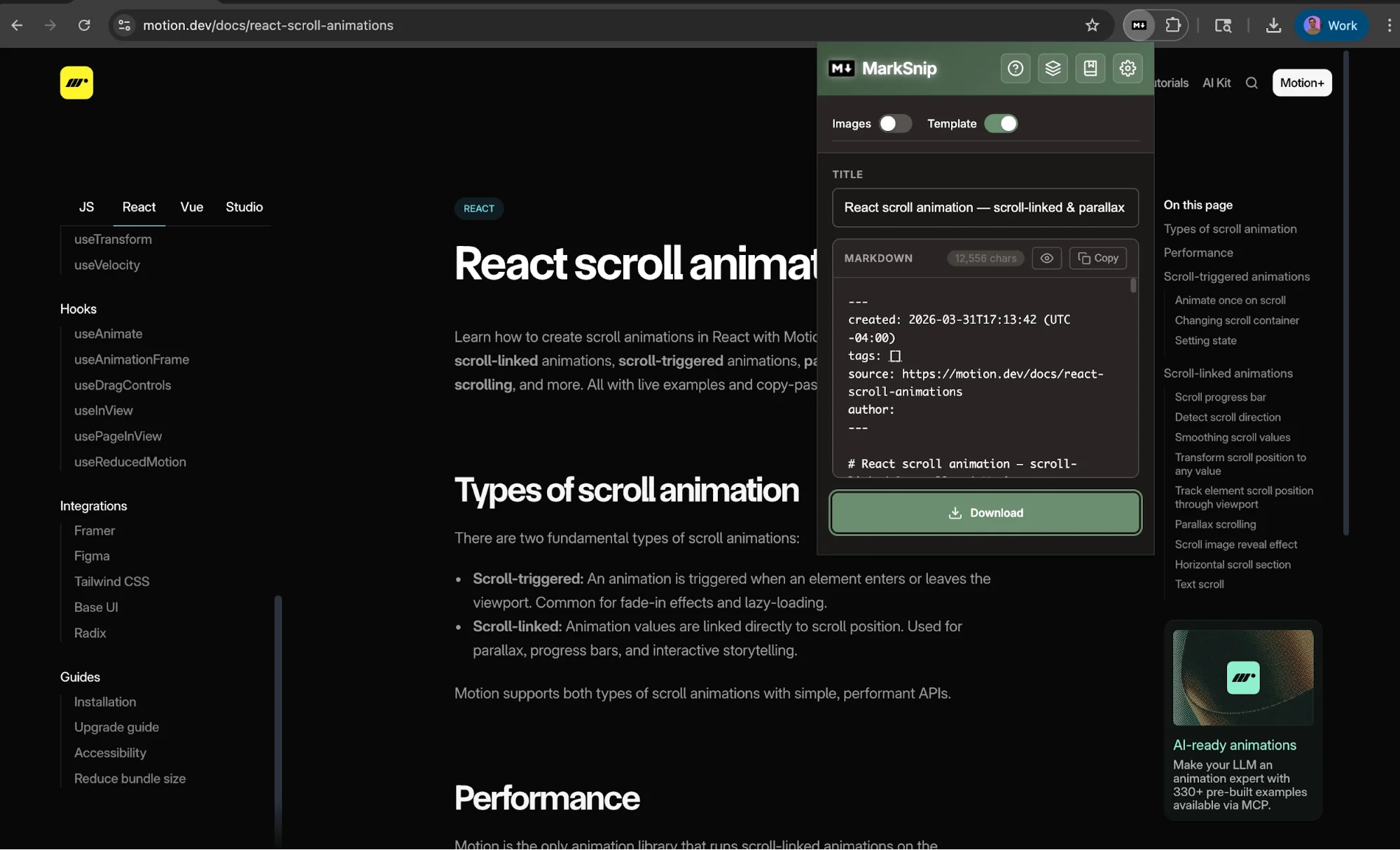
Click the Marksnip extension icon to process the page.
The tool:
- Extracts the main content
- Cleans it using readability tools
- Converts it into structured Markdown
This results in a much cleaner format compared to copying and pasting manually.
Step 3: Save It Inside Your Repository
Place the generated Markdown file into a folder like:
- agent-context/
- project-docs/
This folder becomes your centralized knowledge base.
Benefits include:
- Persistent documentation stored alongside your code
- Clear visibility into source material
- Easy updates when documentation changes
- Consistent context for future AI sessions
For more complex projects, include a small set of files covering setup, core APIs, and recent updates.
Step 4: Direct Your AI Agent to Use This Context
When working with your coding assistant, explicitly point it to the folder.
Example prompt:
“Review the files in the agent-context folder and use them as the primary reference for this task.”
This ensures the agent works from accurate, relevant documentation instead of relying on incomplete memory or outdated assumptions.
Step 5: Customize and Optimize Your Workflow
Once the basic setup is working, you can refine it with additional features:
- File naming templates for consistency
- Automatic folder organization
- Markdown formatting preferences
- Batch processing for multiple pages
- Integration with note-taking tools
These options help turn a simple process into a repeatable system.
Going Further
This method isn’t limited to coding documentation. You can also:
- Save technical blog posts
- Capture useful articles or guides
- Clip discussion threads for reference
For a more advanced setup, combine this manual approach with automated documentation tools. This gives you both curated context and broader access when needed.
By storing key documentation directly in your project, you eliminate the need to repeatedly rebuild context, making your AI coding workflow faster, more reliable, and easier to maintain.

Editorial Staff
The Editorial Staff at AIChief is a team of Professional Content writers with extensive experience in the field of AI and Marketing. AIChief was Founded in 2025, AIChief has quickly grown to become the largest free AI resource hub in the industry. Stay connected with them on Facebook, Instagram and X for the latest updates.



