

AI Tutorial
Automate Inbox Zero with Claude (Email Triage Workflow Guide)
Turn your inbox into an automated system with Claude. Sort emails, draft replies, and clean your inbox daily with one workflow.
Share
Most inbox systems fail for one reason: they still depend on you making the same decisions every single day. Open the inbox, then scan, decide, and repeat.
This guide shows you how to remove that loop entirely. You’ll build a daily email triage system using a single scheduled Claude task. Every morning, your inbox is already sorted, drafts are prepared, and the only thing left is quick approvals.
Who This System Is For
- Founders and operators tired of manually sorting emails every morning
- Anyone buried under newsletters, product updates, and marketing emails
- Claude users who want a practical automation that saves time immediately
What You’ll End Up With
A fully automated email workflow that:
- Scans your unread inbox daily
- Sorts emails into clear categories
- Drafts replies where needed
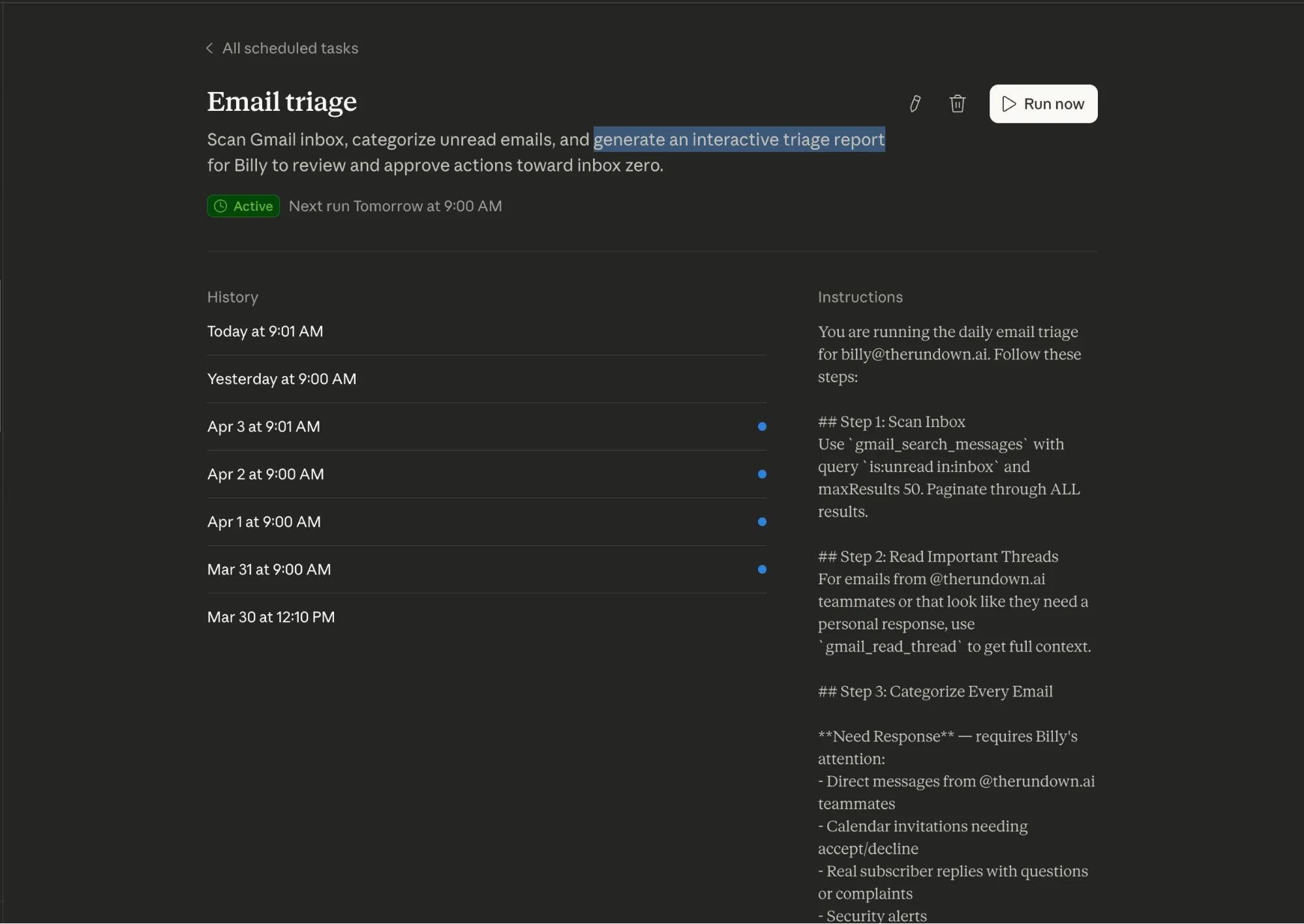
- Generates a clean, interactive report for review
The result of this automation is:
- A near-empty inbox
- Pre-written replies ready to send
- Zero mental overhead deciding what matters
What You Need Before Starting
- Claude Desktop (Pro plan)
- Gmail connected to Claude
- A local folder for reports
- One real batch of unread emails
Step 1: Train Claude on Your Inbox (Don’t Skip This)
Before automating anything, run one manual triage session.
This is what turns a generic system into something that actually works for you.
Start with a prompt like:
- Generate an email triage report for my unread emails from the last 24 hours. Categorize each into: Needs Response, Needs Attention, Archive, or Archive and Unsubscribe.
Then refine it:
- Correct mistakes
- Identify important senders
- Flag newsletters you always ignore
- Highlight emails that matter
This step teaches Claude how your inbox works, not just how email works in general.
Why it matters: Without this, automation becomes guesswork.
Step 2: Turn Your Workflow Into a Repeatable System
Once Claude understands your preferences, have it convert your process into a reusable prompt. Ask:
- Turn this into a recurring inbox triage workflow with my rules and preferences.
The system should include:
- Inbox scanning logic
- Rules for categorization
- Instructions for drafting replies
- Output format (HTML report)
This becomes the engine that powers your daily automation.
Step 3: Build the Daily Report (Instead of Auto-Actions)
Instead of letting AI act immediately, you introduce a checkpoint. Claude generates an interactive HTML report that includes:
- Email categories
- Sender, subject, and summary
- Suggested actions
- Direct Gmail links
- Checkboxes for approval
This is critical. You’re not removing control, you’re removing decision fatigue.
Step 4: Turn It Into a Scheduled Task
Now move into Claude Cowork.
- Create a new scheduled task
- Paste your workflow instructions
- Set a daily trigger (morning works best)
- Assign a folder for reports
Each day, Claude runs automatically and prepares your inbox before you even open it.
Step 5: Review Once, Execute Instantly
Here’s how your new workflow looks:
- Open the generated report in your browser
- Scan categorized emails quickly
- Check the items you approve
- Download the approvals file
- Upload it back to Claude
Claude then:
- Drafts replies
- Applies labels
- Archives or unsubscribes where needed
You just approve. Claude does the rest.
Why This Works (And Most Systems Don’t)
Most email systems try to:
- Auto-label everything
- Auto-reply blindly
This system does something smarter:
- AI handles sorting and preparation
- You handle final decisions
That balance is what makes it reliable.
How to Make It Even Faster
Once labels are in place, connect them to Gmail filters:
- Claude/Archive: automatically remove from inbox
- Claude/Needs Response: star or highlight
- Claude/Unsub: review later in batches
Now your inbox starts cleaning itself, even outside the report.
Going Further: Build a Fully Automated Inbox Stack
Once this system works, you can extend it:
- Add priority scoring
- Customize reply styles
- Route emails to team members
- Integrate with task systems
At that point, your inbox stops being a daily chore and becomes a managed system.
Final Takeaway
Inbox Zero isn’t about reading faster or organizing better. It’s about:
- Removing repetitive decisions
- Automating the predictable
- Reviewing only what matters
With one well-built Claude workflow, your inbox becomes something you check, not something you manage.

Editorial Staff
The Editorial Staff at AIChief is a team of Professional Content writers with extensive experience in the field of AI and Marketing. AIChief was Founded in 2025, AIChief has quickly grown to become the largest free AI resource hub in the industry. Stay connected with them on Facebook, Instagram and X for the latest updates.



