

AI Tutorial
Compare AI Models Faster Using OpenRouter Fusion
Learn how to use OpenRouter Fusion to test several AI models with the same prompt, compare results, check costs, and choose the best model for your workflow.
Share
In this guide, you will learn how to use OpenRouter Fusion to run one prompt across several AI models at the same time. Instead of switching between five different apps and guessing which response worked best, you can review outputs side by side and create a practical cheat sheet for your everyday work.
Who This Helps
- Consultants and operators who use multiple AI tools and need a quicker way to choose the right model for client projects.
- Builders and developers who want to test models before adding them to an app, agent, or coding workflow.
- AI power users who want one place to compare quality, speed, and cost without paying for every separate subscription.
Step 1: Set Up OpenRouter Credits or Connect Your Own Keys
Begin by signing up for a free OpenRouter account. OpenRouter works as one central gateway for many AI models, letting you test models from different providers without switching between multiple platforms.
There are two main ways to use it:
- Add funds to OpenRouter and let it manage model usage for you
- Use BYOK, which means bring your own key, and connect API keys from providers you already use
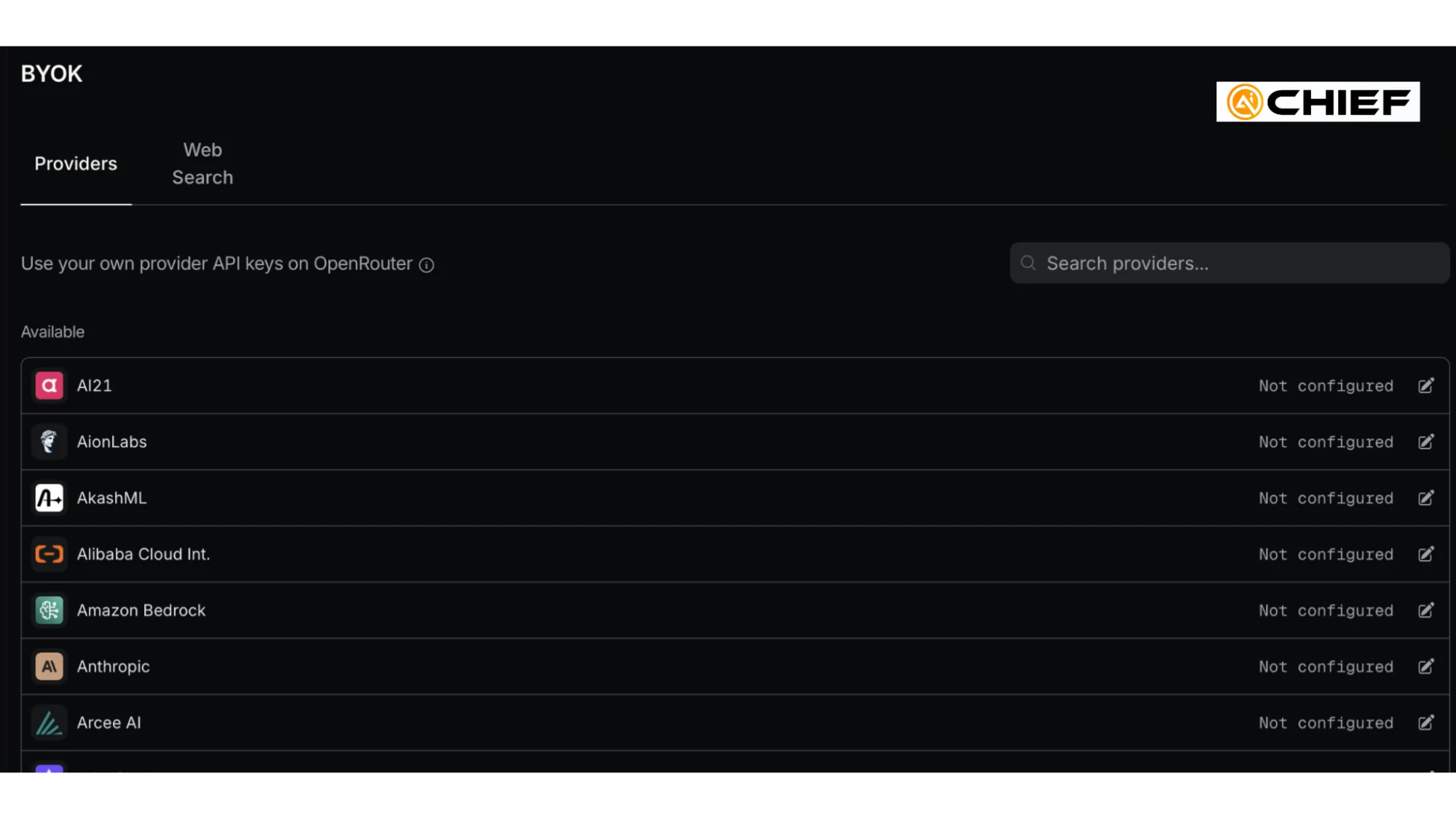
The simple breakdown:
Use OpenRouter credits if you want one balance and one testing dashboard
Use BYOK if you already pay providers separately and want OpenRouter to run through those keys
Step 2: Build a Custom Fusion Comparison
Go to OpenRouter Fusion: https://openrouter.ai/labs/fusion. You will see choices such as Quality, Budget, and Custom.
Select Custom when you want full control over the model comparison.
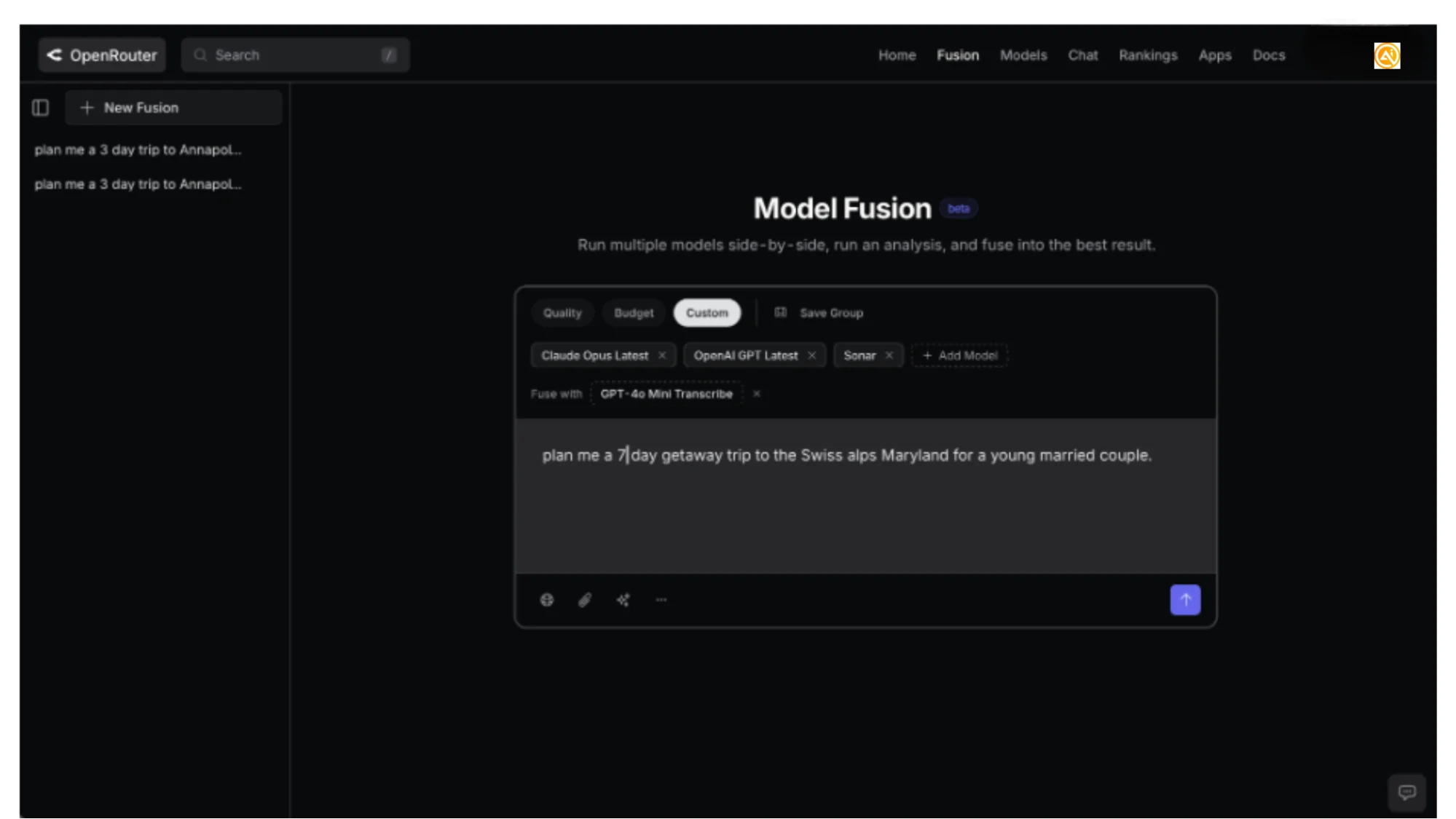
We tested a mix of models, including Claude, OpenAI GPT, Grok, Perplexity/Sonar, and free or lower-cost options. Model names change often, so do not worry too much about picking the perfect starting group.
A solid first comparison includes:
- one model you already rely on
- one model you want to explore
- one low-cost or free model
- one fuse model that creates the final combined answer after the other models respond
The key is that every model gets the exact same prompt.
Pro tip: Do not look for one permanent winner. The model that writes the strongest client email may not be the same model that catches the most coding issues.
Step 3: Test a Business Writing Prompt
Start with a prompt that produces a practical business result. We used a business decision prompt because it quickly reveals differences in structure, clarity, and reasoning.
Use this prompt:
Prompt
Copy
You are advising a 20-person SaaS company deciding whether to replace its weekly status meeting with an async written update.
Write a recommendation memo with:
- a clear recommendation
- 3 benefits
- 3 risks
- a 2-week experiment plan
- a short message the CEO can send to the team
Keep it concise and practical.
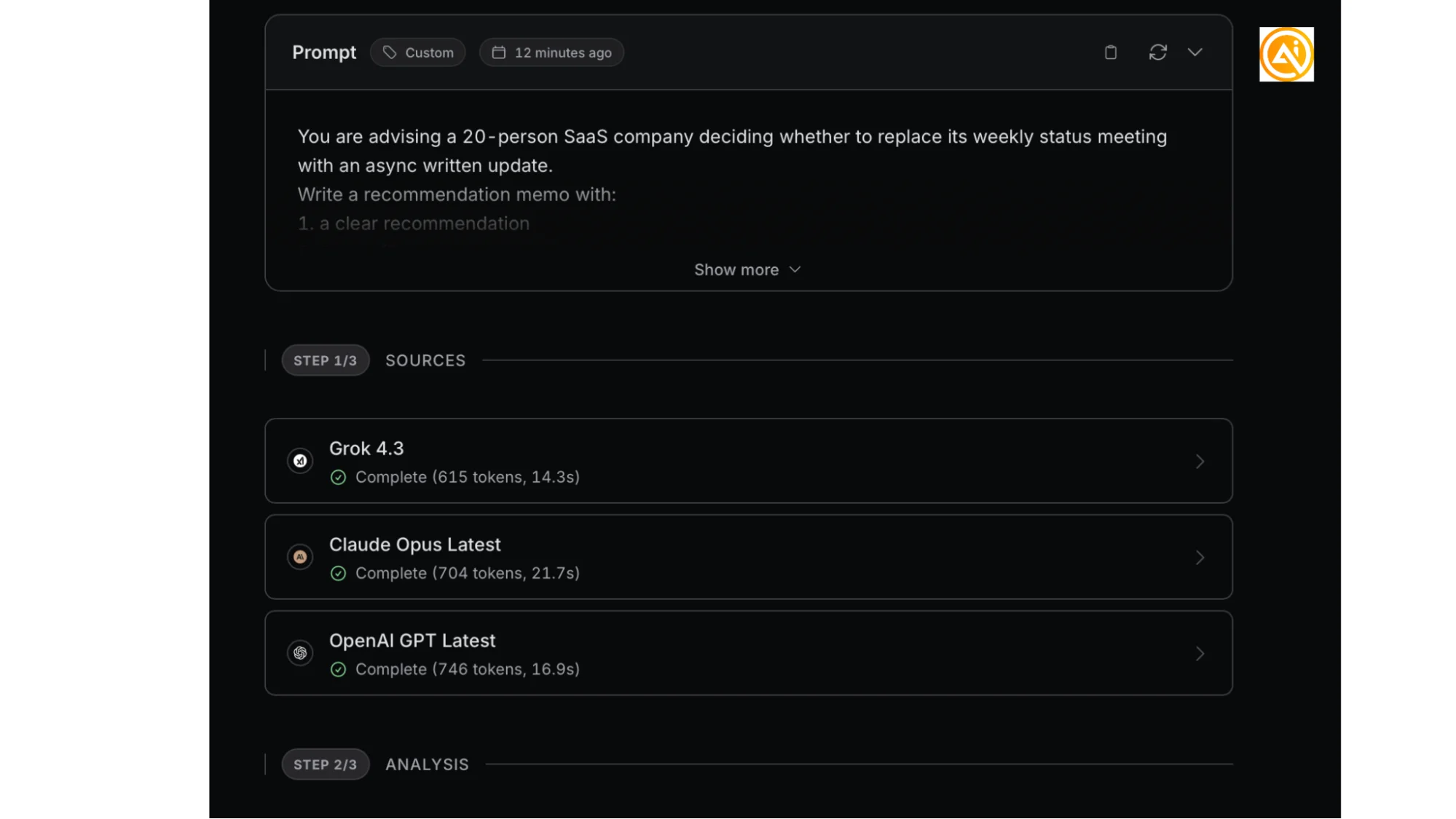
After running the prompt, Fusion sends it to every model you selected.
Open each result and compare:
- which model gives the most direct recommendation
- which one sounds like something you would actually send
- which one adds helpful detail without becoming too long
- which one ignores requirements or gives a generic answer
Then review the fused output.
Fusion’s final response is helpful because it can pull together the strongest structure, examples, and wording from the selected models. It will not be perfect every time, but when different models each handle one part well, it often gives you a better starting draft than any single response.
Step 4: Test a Coding or Debugging Prompt
Next, try a more technical prompt. This is where differences between models become easier to spot because weaker answers can sound confident while missing important edge cases.
Use this prompt:
Prompt
Copy
Here is a Python function and a failing test.
Function:
def parse_price(value):
return float(value.replace("$", ""))
Failing cases:
- "$19.99"
- " $12 "
- "None"
- "free"
Explain the bug, rewrite the function safely, and provide 5 pytest test cases that cover normal and edge cases.
Check whether the model catches:
- None values
- empty strings
- extra whitespace
- invalid text such as free
- realistic tests instead of broad suggestions
We found that models varied a lot in formatting and depth. Claude produced cleaner, easier-to-read code formatting, while the fused Grok response became too long. That is exactly the kind of signal this process is meant to reveal.
Step 5: Review Cost Before Running More Tests
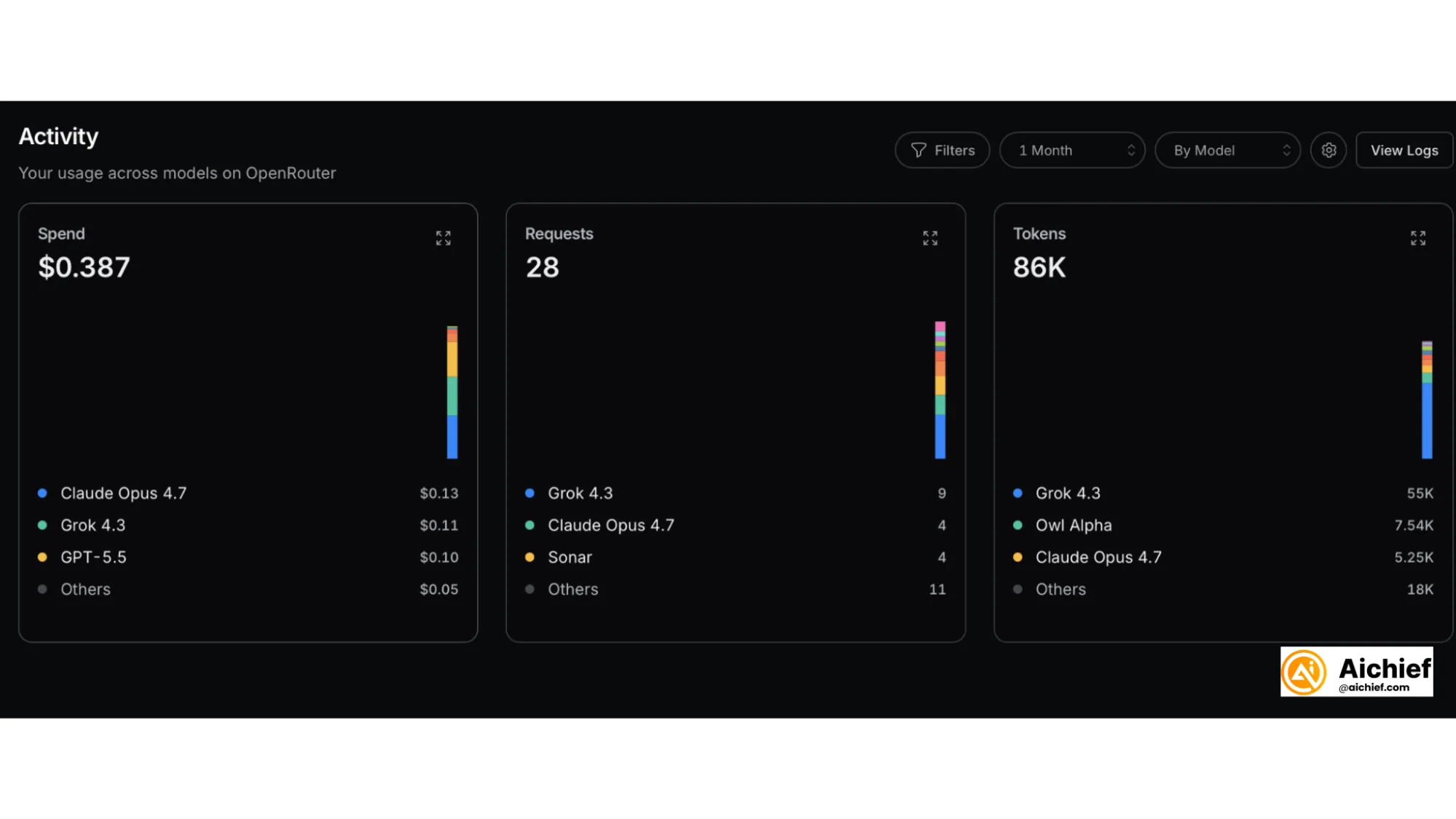
After a few comparisons, open the Activity in OpenRouter.
This shows your spend, number of requests, token usage, and model-by-model cost details. We ran around 10 comparisons and spent about 40 cents.
That is the main benefit. Instead of paying for several subscriptions and guessing which app to use, you can run a low-cost side-by-side test, compare the outputs, and make decisions based on your own results.
Use a simple tracking sheet:
- Business memo: [model] - Best structure and tone
- Coding/debugging: [model] - Catches edge cases
- Search/planning: [model] - Stronger factual coverage
- Fused response: [model] - Best final synthesis
A few focused tests can teach you more than months of randomly switching between different AI apps.
Going Further
After you collect a few results, open the Models tab and compare pricing, speed, and categories.
OpenRouter often includes free or preview models, which can be useful for testing. Just keep in mind that popular models can change quickly, especially when a new research preview is released.
The best next step is to build your own model-routing cheat sheet:
- Run one prompt for business writing
- Run one prompt for coding or debugging
- Run one prompt for research, planning, or summarization
- Record the strongest model for each category
- Re-test whenever a major new model launches
This turns model selection from a guessing game into a quick, repeatable habit.

Editorial Staff
The Editorial Staff at AIChief is a team of Professional Content writers with extensive experience in the field of AI and Marketing. AIChief was Founded in 2025, AIChief has quickly grown to become the largest free AI resource hub in the industry. Stay connected with them on Facebook, Instagram and X for the latest updates.



